Which security habits protect a one-person coaching practice?
A one-person coaching practice runs on one email account, and that account can open every other one. Protect it first, then the settings around it, then the payments that pass through it.
In our webinars for coaches and coaching schools, security is the first question coaches ask.
Who would bother hacking a one-person coaching practice?
Nobody, by name. You are right about that, and it protects you less than it sounds. Phishing, the most common attack on UK businesses, goes to long lists and waits for whoever clicks.
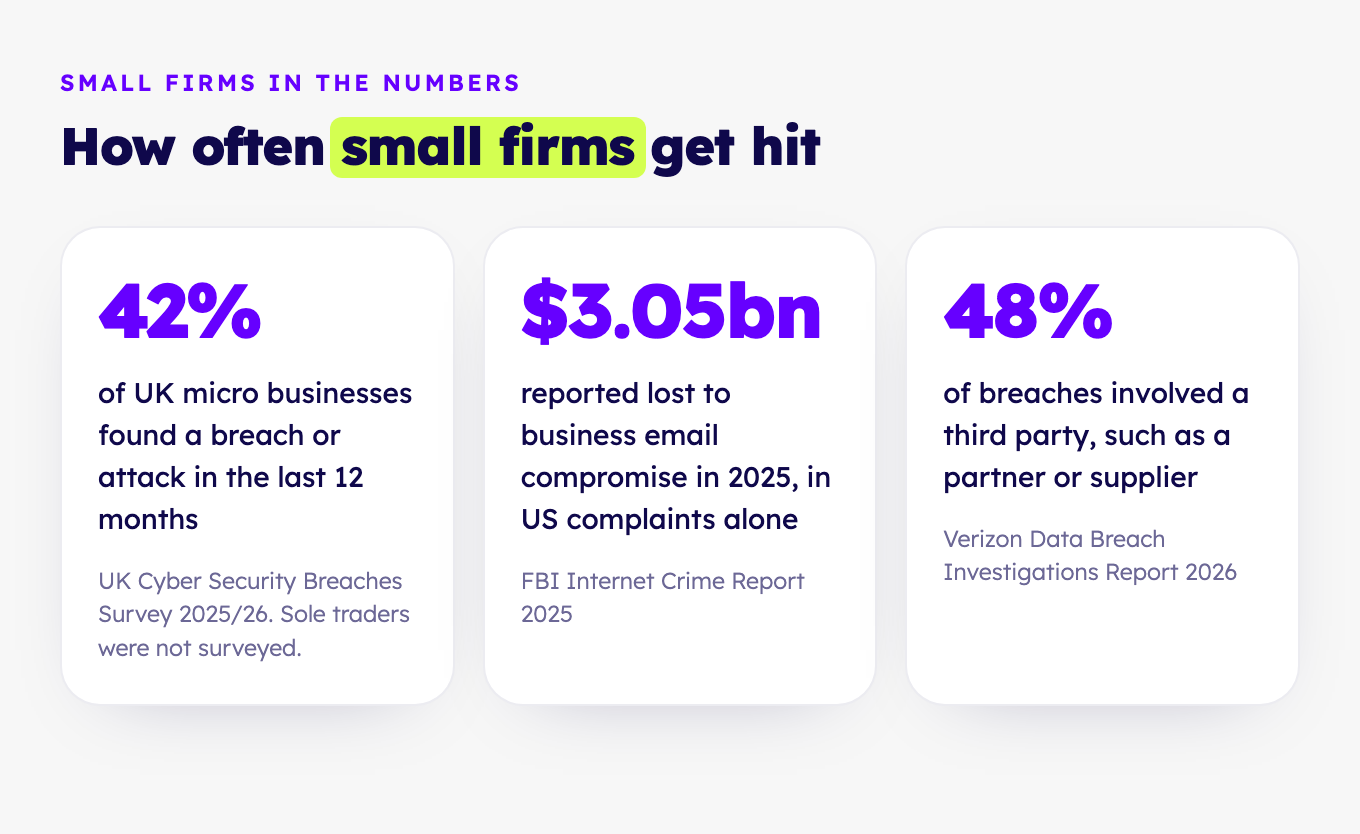
The UK government's Cyber Security Breaches Survey 2025/26 found that 42% of micro businesses (one to nine staff) identified a breach or attack in the last 12 months. Phishing hit 38% of all businesses. Sole traders without staff were outside the survey, so your own odds are not in that number.
The FBI's Internet Crime Report 2025 records $3,046,598,558 lost to business email compromise, second only to investment fraud, in US complaints only. Verizon's 2026 breach report found a third party involved in 48% of breaches, and phone and text lures drew a 40% higher median click rate than email in its phishing simulations.
An attacker wants two things from a coach: the inbox and the notes. Your inbox holds every client's name, their agreement, the invoices you sent and what they wrote to you between sessions. It is a filing cabinet with a very good search bar.
What happens when a practice's session notes leak?
Your clients get the second wave. Vastaamo was a Finnish psychotherapy provider, a clinic and not a coach, and its story shows what notes are worth to a thief.
The thief stole the patient database, session notes included. In October 2020 the thief demanded 40 bitcoin from the company, then emailed patients directly, with a price that rose if they did not pay within 24 hours. Some notes were published online.
The database's root account had no password. In December 2021, Finland's data protection authority fined Vastaamo.
The fine had three parts: one for weak security, one for not telling the authority and one for not telling the patients. Two of the three were about silence.
Your records are not clinical and your duties are smaller, but two are the same: keep client records secure, and speak up when they leak.
ICF's Code of Ethics, in effect from 1 April 2025, asks in standard 2.4 that you maintain, store and dispose of records, electronic files included, in a way that promotes confidentiality, security and privacy. Standard 2.5 applies this directly and through any technology you use, AI included.
The Global Code of Ethics, which EMCC and the Association for Coaching have signed, asks the same and names the data protection law of your client's country.
Notes that touch a client's mental or physical health can count as health data under GDPR Article 9, a special category. This is not legal advice. It is a reason to treat your notes as the sensitive records they are.
If a tool will hold your session recordings, ask it the questions in Is it safe to record my coaching sessions?. At Wundamental, recordings and transcripts are stored encrypted in the EU, and we never train AI models on session data.
Why is your email the account that matters most?
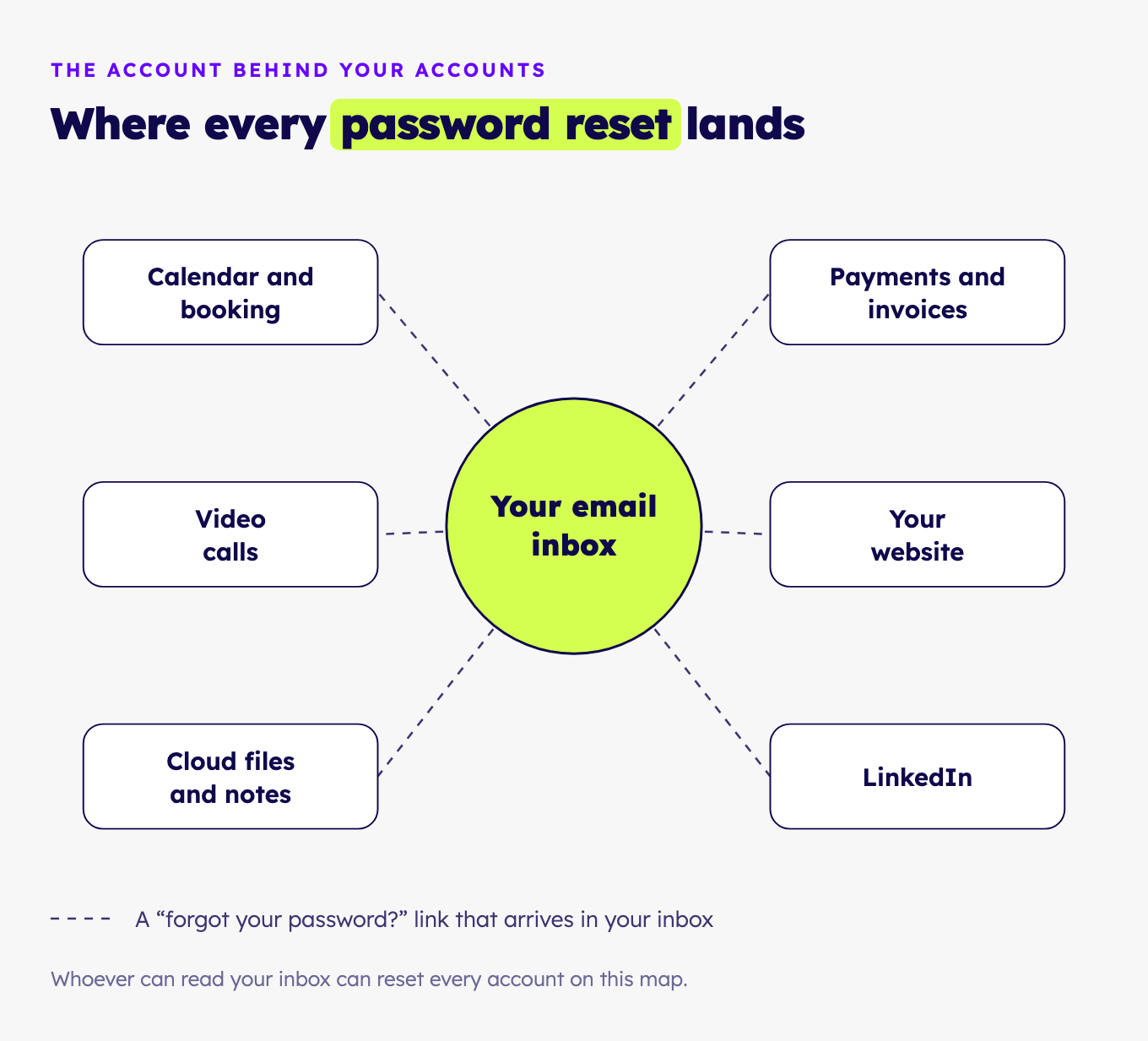
Because it is the way back into everything else. Your calendar, video platform, payment tool and website all send their "forgot password" links to it, so whoever reads your inbox can reset the rest.
Snowflake in 2024 shows how that goes. Mandiant counted as many as 165 organisations potentially exposed. The accounts had no multi-factor authentication.
The credentials came from infostealer malware, which lifts saved logins off a computer, and some were several years old.
One infection started on a contractor's computer that was also used for personal activities. A coach's laptop is home and office at once, so in that story the contractor is you.
How should you sign in to your email?
With a passkey. The NCSC, the UK's cyber agency, defines one as "a secure, passwordless authentication method" that uses your device's fingerprint, Face ID or lock screen PIN. It says passkeys resist phishing because they "can't be intercepted, reused or stolen like passwords", and recommends them over passwords wherever they are available.
Where an account has no passkey, use an app prompt on your phone. Use a text message code only as the floor.
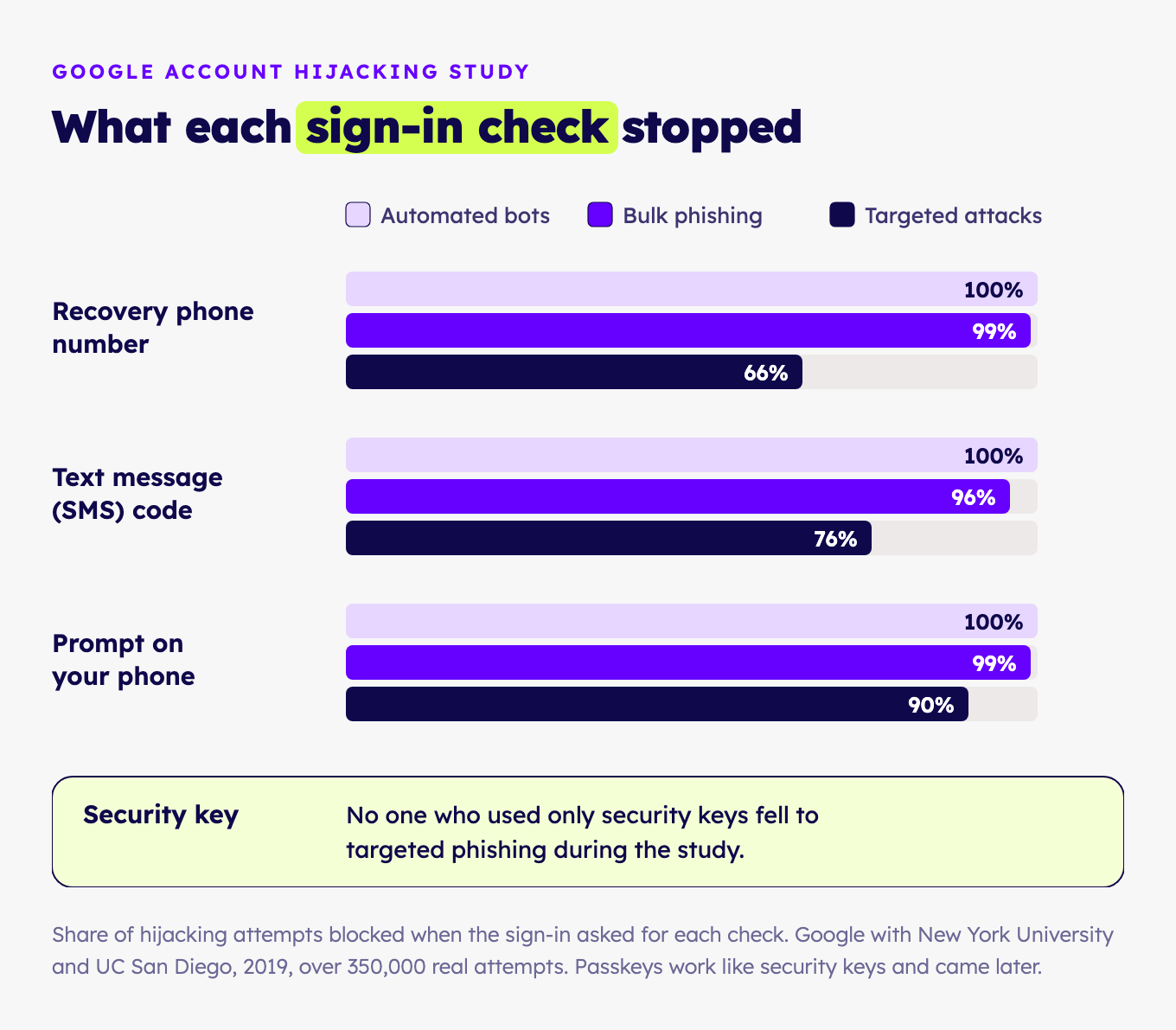
The ranking comes from Google's study with NYU and UC San Diego, published in 2019, of over 350,000 real hijacking attempts. Against targeted attacks, a recovery phone number blocked 66%, a text code 76% and an on-device prompt 90%. Against bulk phishing, the text code blocked 96% and the prompt 99%.
Users who relied only on security keys saw zero successful targeted phishing. The study tested security keys, not passkeys, and dates from 2019.
You may have read that multi-factor authentication blocks 99.9% of attacks. That figure comes from a 2019 Microsoft blog post.
The measured figure, in Microsoft's Digital Defense Report 2023, is that MFA reduces the risk of compromise by 99.2%. Quote the second.
For every account without a passkey, a password manager gives each one its own long password, so one leaked login opens nothing else. CISA's Secure Our World advice pairs the two in one step: use multifactor authentication and a password manager.
Passkeys exist today for Google and Microsoft accounts, and for Stripe Dashboard sign-in, PayPal, Dropbox and LinkedIn. Each service's help page confirmed this on 24 November 2026.
How do forwarding rules and connected apps outlast a password change?
They are settings, and a new password does not touch them. A rule that deletes key messages or forwards your mail elsewhere keeps running after the password has changed. That is why Google's guide for a hacked account sends you back to your forwarding and filter settings.
Connected apps are a quieter door: the calendar, transcription and invoicing tools you once allowed into your account. In August 2025, stolen access tokens of the Drift chat app were used against its customers' data, and more than 700 organisations were affected.
Also in 2025, callers posing as Salesforce IT support talked staff at large companies into approving a malicious connected app.
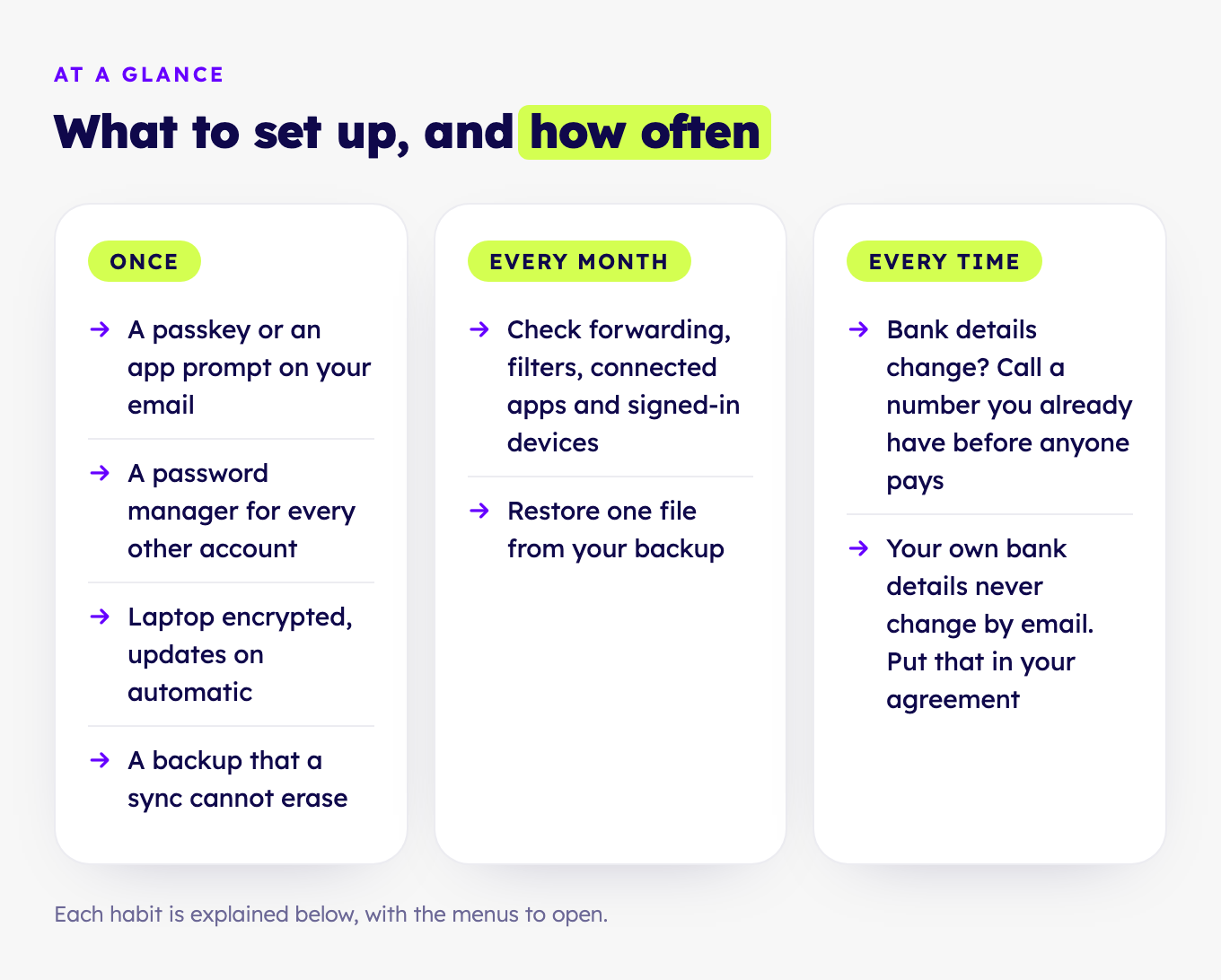
Once a month, check these settings:
- Forwarding. Gmail: Settings → See all settings → Forwarding and POP/IMAP → Disable forwarding → Save Changes. Outlook on the web and new Outlook: Settings → Mail → Forwarding. Google adds that if you see a forwarding notice you never set up, change your password immediately.
- Filters. Gmail: Settings → See all settings → Filters and Blocked Addresses. Delete any filter you did not write.
- Connected apps. In a Google Account, the linked apps page (myaccount.google.com/linkedapps) lists them. Removing access stops the app but does not delete data it already copied.
- Signed-in devices. In a Google Account: Security & sign-in → Your devices → Manage all devices. Sign out of any you do not recognise.
How do you stop a fake change of bank details?
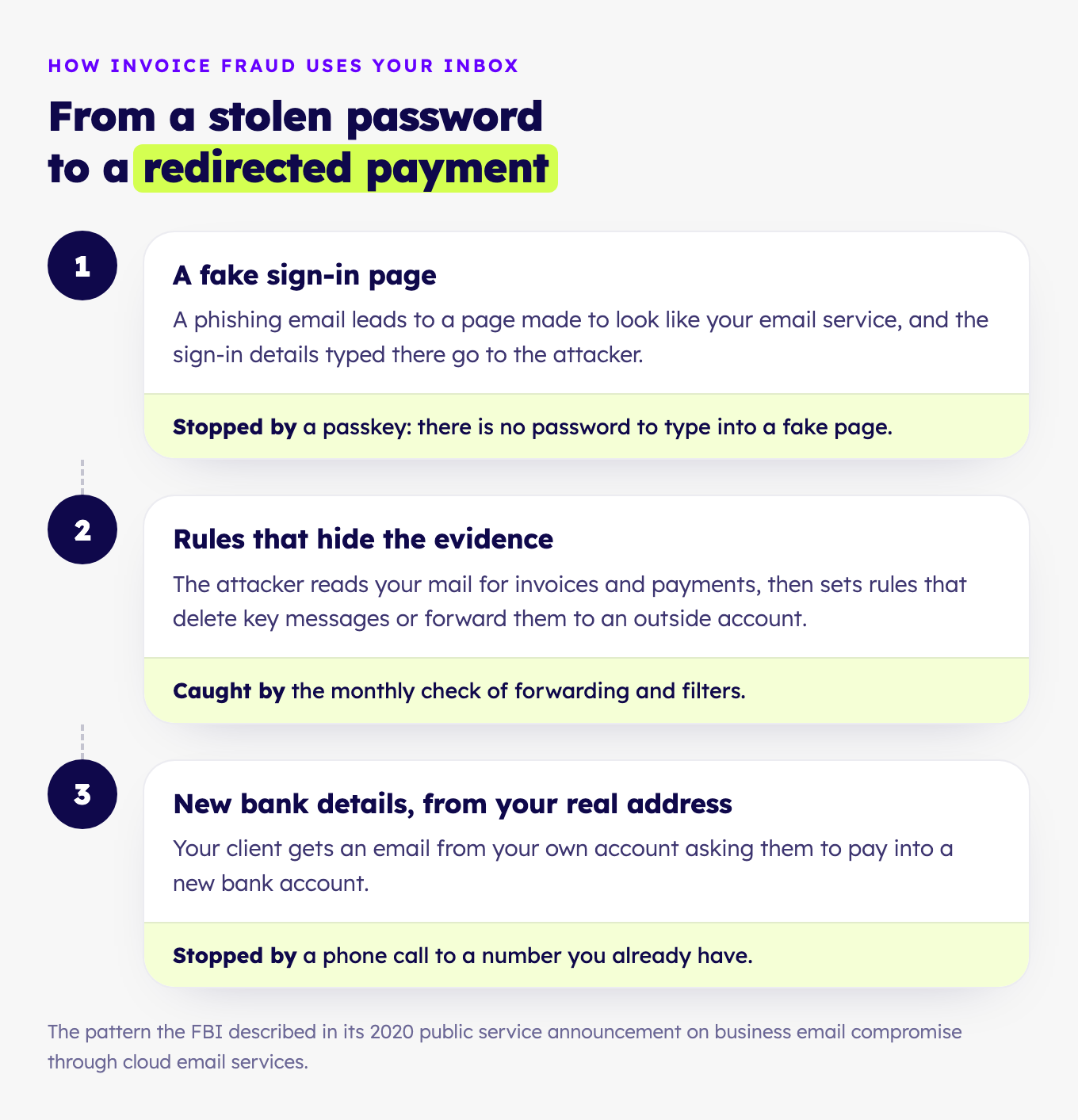
With a phone call, to a number you already have, before anyone pays into new bank details. The fraud runs through email, and the phone is the channel the attacker does not hold.
The FBI described the pattern in a 2020 public service announcement on business email compromise. A phishing page made to look like the email service steals the sign-in details. The attacker then reads the mailbox for invoices and payments, and hides the evidence with the kind of rules described above.
Next come emails to customers, from the real account, asking for payments to go to a new bank account. The address book supplies the next round of phishing targets, so a takeover of your inbox can reach your clients too.
For a coach, the payer is a client, or the sponsor who pays for their coaching. Write into your coaching agreement that your bank details never change by email, so a client knows to call you first.
The UK's National Crime Agency and NatWest sum it up for the person paying as Check, Verify, Never. Check for changed bank details or pressure to pay urgently, verify by calling a number used before, and never transfer money until the details are confirmed. Share it with the clients who pay you.
Figures from Action Fraud, the UK's fraud reporting centre, show invoice fraud victims lost £3,908,086 across 83 cases in September 2025 alone.
How should you back up your files and protect your laptop?
A backup a sync cannot erase. Google Drive and OneDrive are sync tools. Delete or scramble a file on one device, and the change reaches every other device.
Personal accounts keep deleted files for 30 days, then they are gone. A sync copies your mistakes as faithfully as your work.
CISA's rule is 3-2-1: 3 copies of important files, 2 different types of storage media, and 1 copy stored off-site. The NCSC adds that the backup drive should not stay connected when you are not using it, and that you should know how to restore it. Restore one file this month and see.
Encryption is what stands between a stolen laptop and your session notes. On a Mac: System Settings → Privacy & Security → FileVault → Turn On. On Windows: Settings → Privacy & security → Device encryption, or BitLocker on Pro editions.
In Verizon's 2026 report, 31% of breaches started with an exploited software flaw, now ahead of stolen passwords as the top way in. Organisations took a median of 43 days to fully fix a critical flaw.
With automatic updates on, the laptop that holds your session notes installs a fix soon after the maker ships it.
What do you do in the first hour after an account is taken over?
Get back in first, through your provider's recovery page. Then work through these checks, drawn from Google's guide for a hacked account:
- Review your recent security events.
- Check your devices and sign out of any you do not recognise.
- Change your password.
- Turn on 2-Step Verification.
- Check your recovery phone number and recovery email.
- Remove third-party access you did not grant.
- Check Gmail forwarding, delegation and filters.
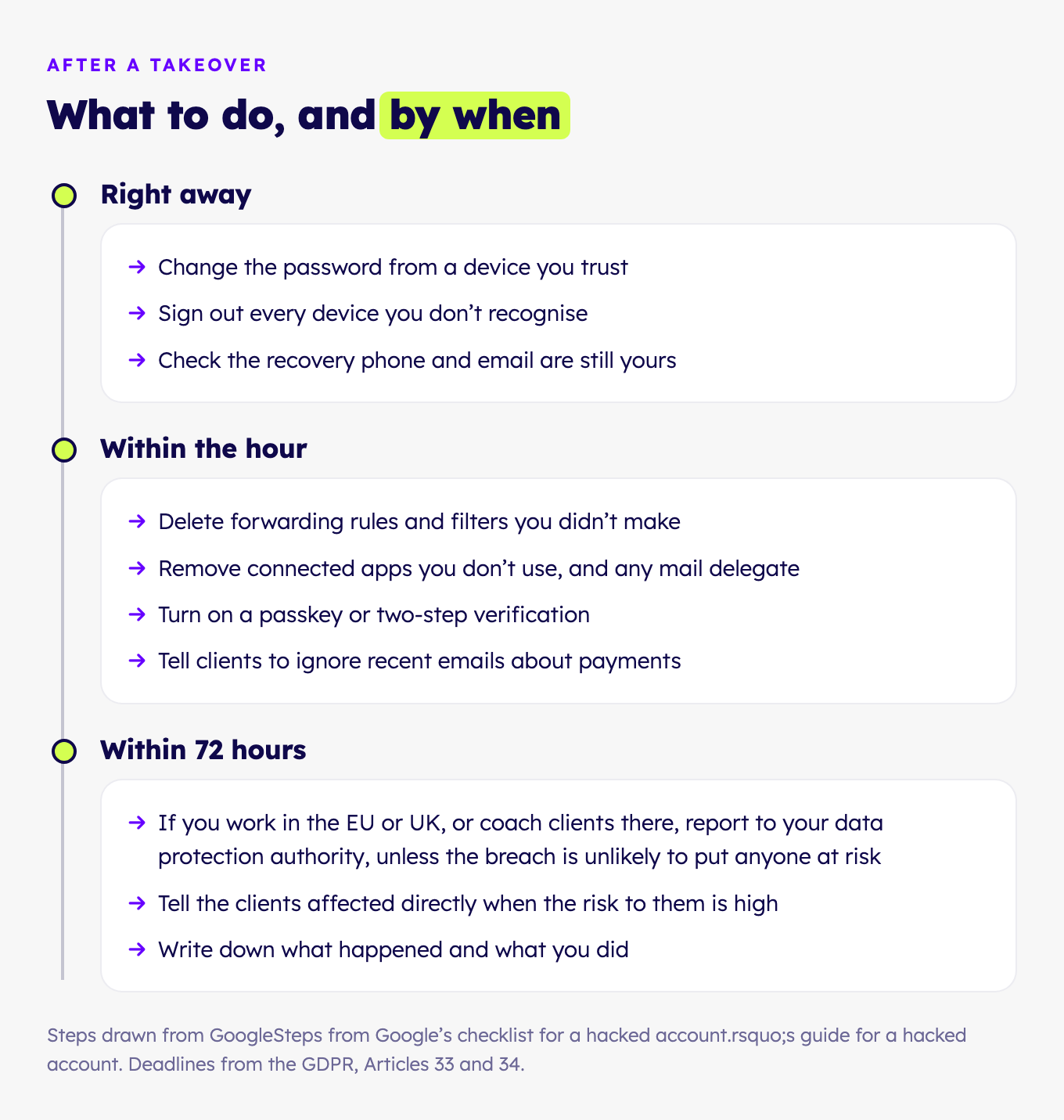
Then warn your clients to ignore any recent email about payments.
If you work in the EU or UK, or coach clients there, the GDPR (or the UK GDPR) applies. Unless the breach is unlikely to put anyone at risk, its Article 33 asks you to tell your data protection authority within 72 hours of becoming aware of it. When the risk to clients is high, Article 34 asks you to tell them directly as well.
In the UK survey, only 21% of micro businesses had a formal incident response plan. This list is yours. Keep a copy where you can reach it without your email.
Why should a passkey on your email come first?
Because your email holds the keys to the rest. Set up a passkey on it today.
Common questions
Is a text message code good enough for two-step verification?
It beats no second step, and it is the floor. Where an account offers a passkey or an app prompt, choose that.
Do I have to report a hacked email account?
Yes, if you work in the EU or UK, or coach clients there, and personal data was exposed. GDPR Article 33 gives you 72 hours from becoming aware to tell the data protection authority, unless the breach is unlikely to put anyone at risk. When the risk is high, Article 34 adds telling the people affected.
Is Google Drive or OneDrive a backup?
No, because both sync. A deleted or scrambled file is deleted or scrambled on every device, and the trash keeps files for only 30 days. Keep one copy offline, and test restoring a file.
Sources
- Cyber security breaches survey 2025 to 2026
- FBI Internet Crime Report 2025
- Cybersecurity insights for SMBs
- Vastaamo data breach
- Enforcement Tracker: ETid-952
- ICF: Code of Ethics
- Global Code of Ethics for Coaches, Mentors and Supervisors (V4, updated December 2025)
- Art. 9 GDPR: Processing of special categories of personal data
- Art. 33 GDPR: Notification of a personal data breach to the supervisory authority
- Art. 34 GDPR: Communication of a personal data breach to the data subject
- As many as 165 companies potentially exposed in Snowflake-related attacks, Mandiant says
- New research: How effective is basic account hygiene at preventing hijacking
- Evaluating login challenges as a defense against account takeover
- Microsoft Digital Defense Report 2023
- Passkeys: what you need to know
- Secure Our World
- FBI IC3 Public Service Announcement PSA200406
- News brief: Salesloft Drift breach update and timeline
- How ShinyHunters Hacking Group Stole Customer Data from Salesforce
- Automatically forward Gmail messages to another account
- Create rules to filter your emails
- Turn automatic forwarding on or off in Outlook
- Share some access to your Google Account data with apps from other developers
- See devices with account access
- Secure a hacked or compromised Google Account
- NCA and NatWest launch campaign to protect against invoice fraud in business
- Back up business data
- Backing up your data
- Delete or restore files in Google Drive
- Restore deleted files or folders in OneDrive
- Protect data on your Mac with FileVault
- Turn on device encryption