Is it safe to record my coaching sessions?
The danger in recording a coaching session is rarely the recording. It is the copies you forget.
Follow one session. A one-hour session on a Tuesday can leave copies in places most coaches never check, each with its own owner and its own clock.
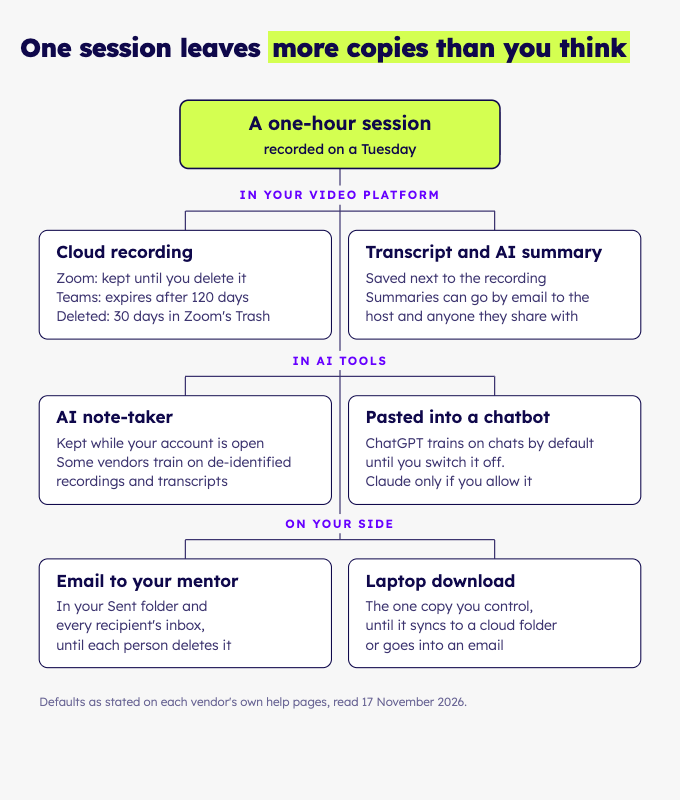
Where does one session end up?
In more places than the recording itself. Here is where each copy sits, how long it stays by default, and what happens when you delete it.
| Where the copy sits | Kept by default | After you delete it |
|---|---|---|
| Zoom cloud recording | Until you delete it, unless you switch on "Delete cloud recordings after a specified number of days" | 30 days in Trash, then gone |
| Zoom local recording | In a "zoom" folder inside your Documents | Your computer's bin |
| Microsoft Teams, in the organiser's OneDrive | Expires after 120 days (your admin's "Default expiration time") | Up to 93 days in the recycle bin |
| Google Meet, in the organiser's Drive | No automatic deletion | Drive's own bin |
| AI note-taker | While your account is open ("as long as necessary") | Depends on the vendor |
| Email to a mentor or supervisor | Until each person deletes their copy | Each inbox has its own bin |
| Claude chat | Until you delete it | Up to 30 days in the back end |
| Laptop download | Until it syncs to a cloud folder or goes into an email | Your computer's bin |
Training is the second question. Here is what each tool says it does with what you give it:
| Tool | Trains AI on your content? |
|---|---|
| Zoom | No, by Zoom's own statement |
| ChatGPT Free, Plus, Pro | Yes by default. Switch off "Improve the model for everyone" in Settings → Data controls |
| ChatGPT Business, Enterprise, Edu | No, by default |
| Claude Free, Pro, Max | Only if you allow it under "Model Improvement" |
| Otter | May use de-identified audio and transcripts |
| Fathom | May use de-identified meeting data, depending on settings |
| Fireflies | No, by its own statement |
A thumbs up or down can change that. ChatGPT may then use the whole conversation for training even with the setting off, and Claude stores it for up to 5 years.
Our view: "de-identified" protects less than it sounds in coaching. A restructuring, a named company or a family situation gives the client away without a name.
Run this audit on your most recent client session. List every place it exists, from the platform to your downloads folder. Then write the deletion rule next to each stop.
Look hardest at synced folders and old email threads. A forgotten copy is where a client's words outlive the agreement you made with them.
Copies also multiply through convenience. A transcript pasted into a chat tool for a summary becomes a chat.
A summary sent to a mentor becomes an email. Each helpful step adds a copy with its own clock.
Which settings should you check today?
Check these places, one tool at a time:
- Zoom: in the web portal, switch on "Delete cloud recordings after a specified number of days". Check whether Trash is enabled, and empty it.
- Teams: open the Recordings folder in your OneDrive and delete what you no longer need. Ask your admin what "Default expiration time" is set to.
- Meet: open the Google Meet folder in your Drive (older recordings sit in Legacy Meet Recordings). Check who each file is shared with, and look for Gemini notes in the same place.
- ChatGPT: Settings → Data controls, then switch off "Improve the model for everyone". Use Temporary Chat for anything sensitive, and skip the thumbs.
- Claude: open Privacy Settings and check "Model Improvement". Use Incognito for sensitive material, and skip the thumbs.
- Any note-taker: turn off calendar auto-join, so it never walks into a client session on its own. Then read the training line in its privacy policy.
Checked on the vendors' own help pages on 17 November 2026. Menus change, so look again before you rely on them.
What do you tell your client, and when?
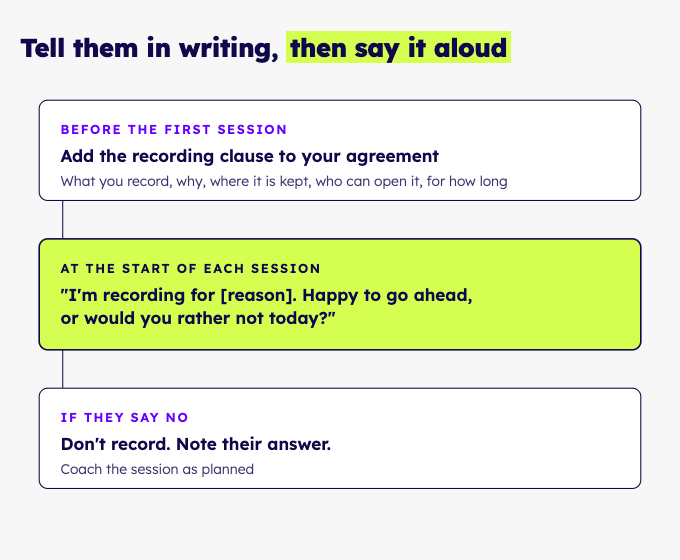
Tell them in writing before the first recording, and say it aloud at the start of each session.
The main coaching ethics codes never mention recording. A recording still falls under what they ask of you: a clear agreement with your client, confidential records, and consent before you use your client's data.
If a mentor, supervisor or assessor will hear the session, get your client's written permission first. Some credentialing bodies require it.
Copy this into your coaching agreement and fill the brackets:
I record our sessions so that [reason]. [Tool] stores the recording in [place] and turns it into a transcript, and [AI tool] analyses the transcript.
[Names, including any mentor, supervisor or assessor] can open it. I keep it for [period], then I delete it.
To have it deleted sooner, write to me and I will confirm when it is done. You can say no to recording any session, including today's.
Give a real reason for [reason]. "To review my own practice" and "so my mentor coach can give feedback" are honest and specific. "For quality purposes" tells your client nothing.
Name the reviewer and their role. A client who sees that in advance can say no before the session, not after it.
At the start of a session, say one line: "Before we start: I'm recording for [reason]. Happy to go ahead, or would you rather not today?"
If your client says no, do not record. Never record secretly. Note their answer in your records and run the session as planned.
What if a client asks you to delete everything?
Work through every copy, then confirm in writing what you deleted and when. Deleting the recording alone leaves the transcript, the summary and the email behind.
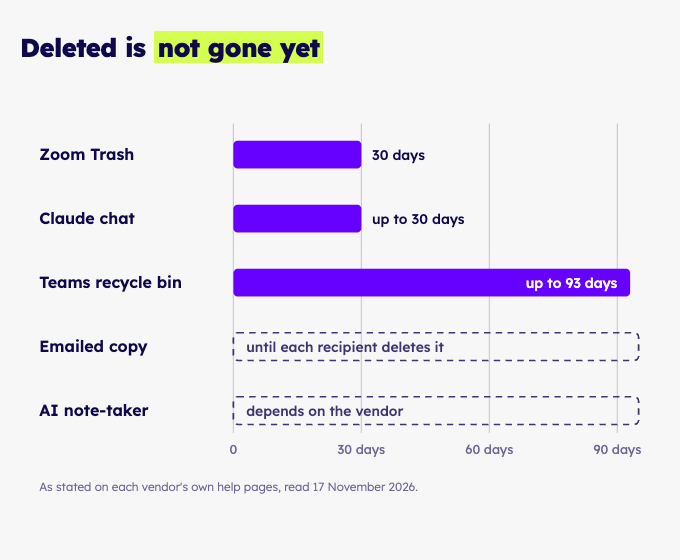
- Video platform. Delete the cloud recording, then empty its Trash or recycle bin. Zoom holds deleted recordings for 30 days and Teams for up to 93.
- Note-taker. Delete the meeting and its transcript in the account. Read its policy for what happens to backups.
- Sent mail. Delete your copy and ask every recipient to delete theirs.
- Chat tools. Delete the chat. Claude removes it from its back end within 30 days, so tell your client "within 30 days", not "now".
- Downloads and synced folders. Delete the file, then check the cloud folder's own bin.
- Your notes. Keep only what your agreement says you keep.
Expect the slowest copy to set your answer. A platform's Trash, a note-taker's backups and a recipient's inbox each run on a different clock, and you control only your own. Promise your client the steps you can complete, and report the rest as they finish.
Then write to your client. Say what you deleted, where, and when. Name the windows that remain, such as 30 days in a platform's Trash.
What do "encrypted" and "deleted" mean?
"Encrypted" can mean the file is protected on the way, where it is stored, or both. Ask which one a vendor means.
"Deleted" at many companies means hidden. Ask whether deleting a session removes the recording and the transcript, or only hides them from your list.
At Wundamental, recordings and transcripts are stored encrypted in the EU. Deleting a session removes its recording and transcript at once, and we never train AI models on session data.
One click takes a session from upload to transcript and analysis, with coach and client detected automatically. That keeps a session in one place, where it would otherwise sit in a recording app, a transcription tool, a chatbot and an email chain.
Ask every vendor the same plain questions, ours included. Walk away from one that answers with a certificate logo instead of a sentence.
What should you ask any tool before you upload a session?
Ask these, and write down the answers:
- Where is the recording stored, and in which country?
- Who can open it, the company's own staff included?
- Does anyone train a model on it, now or later?
- How is it deleted, and does deletion reach the backups?
- What do you tell your client, and in what words?
On a privacy page, look for wording that leaves a question open:
- "as long as necessary", with no period attached
- "may use de-identified data to improve our services"
- no list of the outside companies that handle your data
- deletion described only as closing the account
An answer counts when it is a sentence you could repeat to your client. "Stored in [country], opened only by you, gone within [days] of deletion" is one. A badge and a link to a policy is not.
Start with ours. Open our security and privacy page and read it the way your client would.
Common questions
Do I need written consent to record a client?
Get it in writing. Coaching ethics codes ask for a clear agreement with your client, and a signed clause is the simplest proof of one. When anyone else will hear the session, written permission is a must.
Is a recording on my laptop safer than in a tool?
Only while it stays a single copy, because then you know where it is. Once it syncs to a cloud folder or goes into an email, you have a trail again. A tool that answers the questions above in plain words beats a folder you cannot account for.
Can I use ChatGPT for session notes safely?
Only with care: switch off "Improve the model for everyone", use Temporary Chat, skip the thumbs, and remove names and identifying details first. Temporary Chat can still keep a chat for up to 30 days for safety. In our view, a general chat tool was not built for client confidentiality.
Sources
- ICF: Code of Ethics
- Global Code of Ethics for Coaches, Mentors and Supervisors (V4, updated December 2025)
- ICF: Mentor Coach Specialization Handbook (April 2026)
- ICF: Performance evaluations
- Zoom: Managing cloud recordings and Trash
- Zoom: Local recordings and cloud transcripts
- Zoom: AI Companion summaries and data use
- Microsoft: Teams recording expiration policy
- Microsoft: Where Teams meeting recordings are stored
- Google Meet: Record a video meeting
- Otter.ai: Privacy policy
- Fathom: Privacy policy
- Fireflies.ai: Privacy policy
- OpenAI: Data controls in ChatGPT
- Anthropic: Is my data used for model training?
- Anthropic: Privacy policy