Which software is best for ICF mentor coaching in 2027?
What changes for mentor coaches in 2027?
From 1 January 2027, new mentor coaching hours count toward an ICF credential only when you hold the Mentor Coach Specialization at the level of mentor coaching you give. Hours your mentees completed before that date are still accepted. Our article on the Mentor Coach Specialization covers that rule.
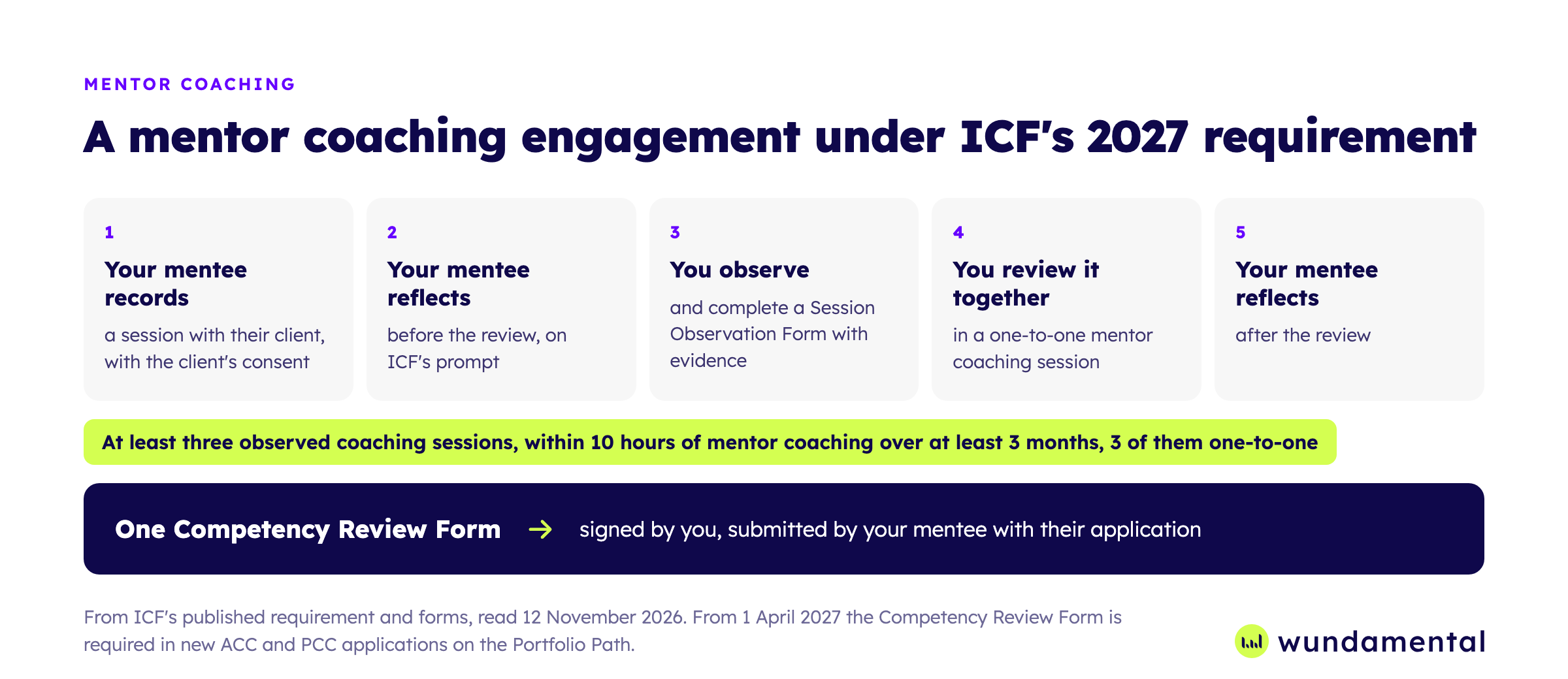
Your work is then documented on two ICF forms. You complete a Session Observation Form for each of your mentee's coaching sessions that you observe, at least three in an engagement. One Competency Review Form then summarises the engagement.
The engagement itself does not change: 10 hours over at least 3 months, with at least 3 of those hours one-to-one. ACC and PCC applicants on the Portfolio Path can submit the Competency Review Form from 1 January 2027, and from 1 April 2027 it is required. MCC candidates still submit recordings.
So your judgement now goes into your mentee's application with your signature on it. That raises the bar for how you find the evidence, and for where the record is kept.
What should mentor coaching software do for you?
Listening back to find the moment is the slow part of the work. Our view is simple: software should find the evidence, and the rating should be yours. That gives six things to look for.
- ICF's forms built in. You complete the Session Observation Form and the Competency Review Form at your level, not in a Word file beside it.
- Evidence with timestamps. The quote and the timestamp where a marker shows up, so you spend less time searching the recording.
- Your view first. You decide whether a rating is suggested before you have formed your own.
- The whole engagement on record. Hours, reflections, consent, signatures and the documents your mentee submits.
- Your client's data protected. You can say who holds the recording, where, and that it does not train AI.
- A track record. A named company, time in use and people who vouch for it.
How do the main options compare?
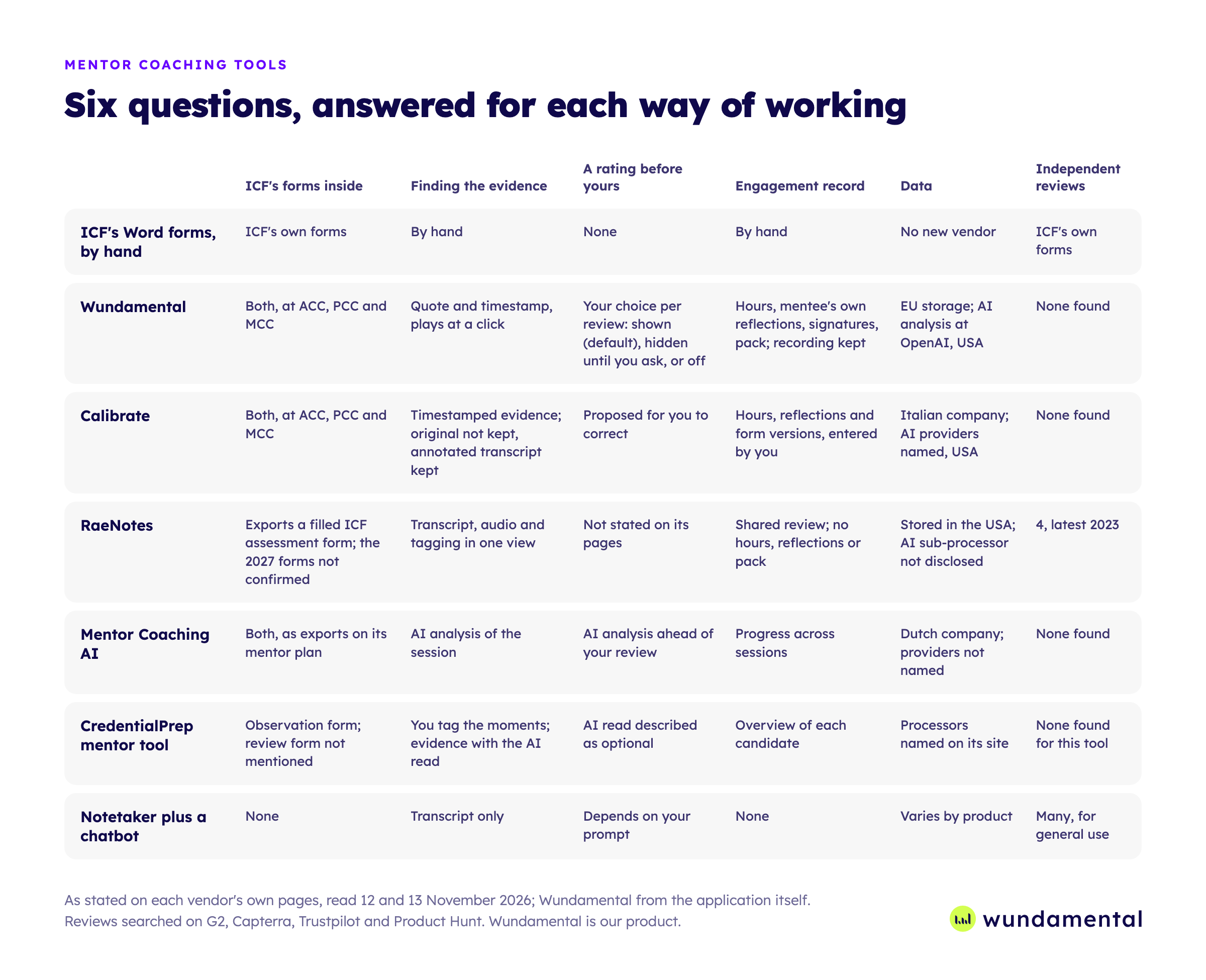
Wundamental. You complete both forms at ACC, PCC and MCC, with the statements in the wording of ICF's public forms. Evidence is quoted from the transcript with its timestamp, plays from that moment at a click, and can be dropped into the form field you are writing in.
Every rating starts empty, with a suggested rating beside it by default. You can open a review in "Own read first", which hides suggestions until you ask, or switch them off. Only the ratings and text you accept or write appear on the exported forms.
The engagement stays with the forms. That covers your mentee's reflections before and after, hours split into one-to-one and group against ICF's 10 hours and 3 months, your signature, and the documents your mentee submits, as PDF or Word.
Your mentee uploads by link without an account. Wundamental covers ICF's framework and one-to-one sessions.
Calibrate. It drafts both forms from a transcript or audio, with proposed ratings, and you correct each one and download ICF's Word form. You add the hours and your mentee's reflections, and it stores each validated version of the form.
Calibrate is an Italian company and names its AI providers, which it says do not train on your content. It does not keep the original transcript or audio, so you cannot replay the recording there later, while the report, the annotated transcript and your notes stay in your account. Its monthly Mentor plan adds upload links for your mentees.
RaeNotes. It has been online since 2019, longer than the other specialist tools here, with transcript, audio and competency tagging in one view. Several assessors can review the same session, and its plans include frameworks beyond ICF, EMCC among them.
It exports a filled ICF assessment form. We could not confirm from its public pages whether that covers the two 2027 forms. RaeNotes states that data is stored in the United States and is not used to train AI.
Mentor Coaching AI. Its mentor plan lists exports of both forms, reviewed by the mentor coach, with an AI analysis ahead of your review. It is a Dutch company and states that your recordings are not used to improve its platform.
CredentialPrep. In this exam preparation product's mentor tool you rate each marker yourself, and an AI read of the session with suggested ratings is there if you want it. The beta includes 10 free evaluations and a Session Observation Form to download, and its page does not mention the Competency Review Form.
A notetaker plus a chatbot. Otter, Fathom, Fireflies or tldv give you a transcript, not a form. Fireflies and tldv state that your content is not used to train AI.
ICF's Word forms, by hand. ICF publishes the forms as Word files, and no new vendor handles the recording. You replay the recording and type the evidence yourself, which still works with one or two mentees a year.
How does the session get in, and in which language?
A review starts with a recording and a transcript, so look at how each tool gets them and which languages it handles.
| Option | Getting the session in | Languages |
|---|---|---|
| Wundamental | Your mentee's upload link, your own upload, or Wundabot joins your Zoom, Google Meet and Microsoft Teams calls | Transcribes over 30 languages. The analysis is written in English, with quotes in the original |
| Calibrate | Upload a transcript or audio | Sessions in any language, reports in 7 |
| RaeNotes | Upload, or bring the recording from Zoom | 11 languages listed on its page for coaches |
| Mentor Coaching AI | Upload a transcript or recording, with a meeting bot listed as coming | Not stated on its pages |
| CredentialPrep | Upload a recording or paste a transcript | Not stated on its page |
| ICF's Word forms | You arrange the recording and transcript yourself | Any |
For your own online sessions, Wundabot joins only the calls you choose and the transcript arrives with no file to move. A mentee with their own Wundamental account can record the same way and share the finished session with you, on their own session allowance. Transcription is part of the plan, in the language you coached in.
What do you get for the price?
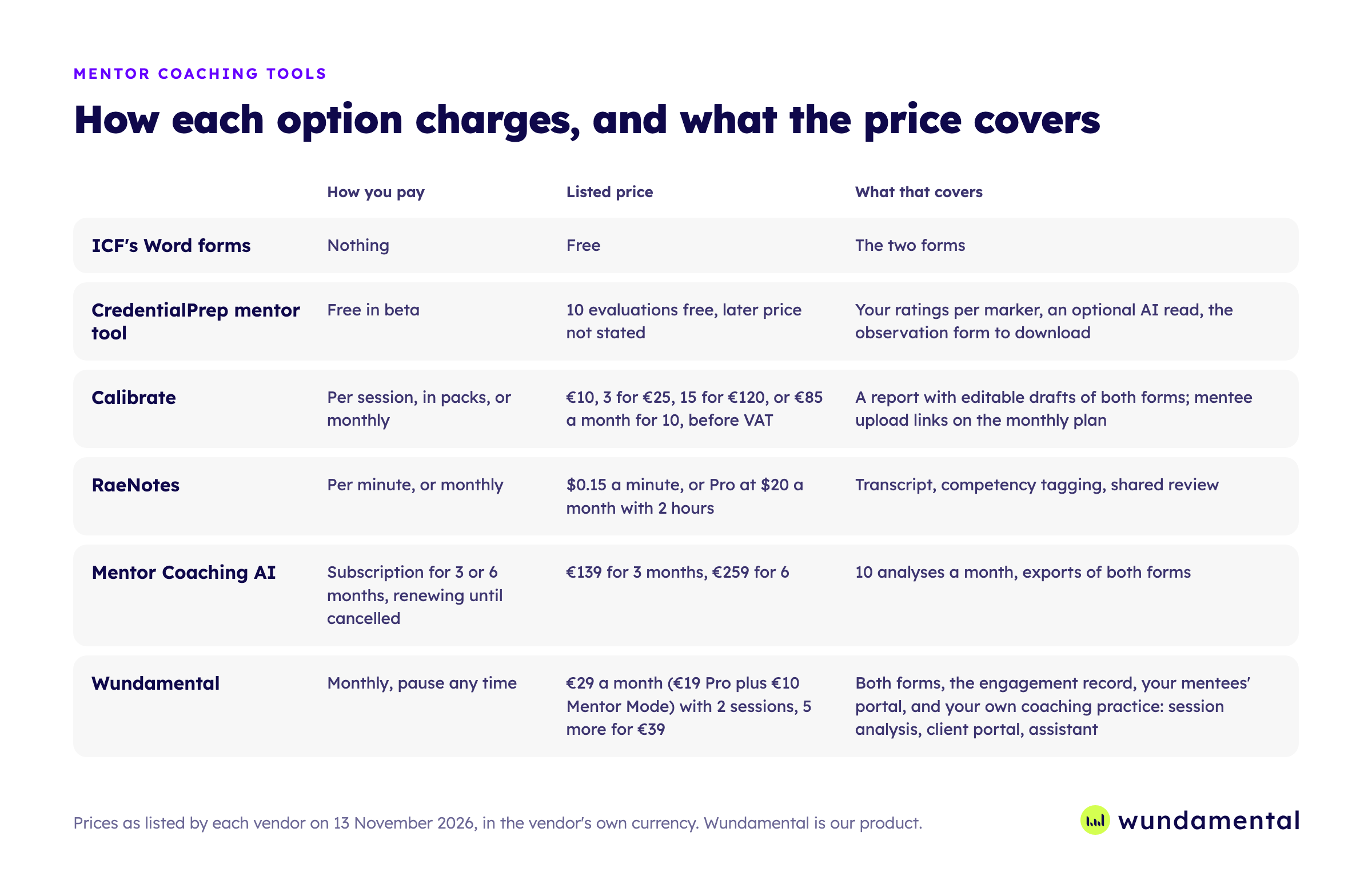
The tools charge in different ways, so compare what each price covers as well as the figure.
| Option | How you pay | Listed price | What that covers |
|---|---|---|---|
| ICF's Word forms | Nothing | Free | The two forms |
| CredentialPrep mentor tool | Free in beta | 10 evaluations free, later price not stated | Your ratings per marker, an optional AI read, the observation form to download |
| Calibrate | Per session, in packs, or monthly | €10, 3 for €25, 15 for €120, or €85 a month for 10, before VAT | A report with editable drafts of both forms, and mentee upload links on the monthly plan |
| RaeNotes | Per minute, or monthly | $0.15 a minute, or Pro at $20 a month with 2 hours | Transcript, competency tagging, shared review |
| Mentor Coaching AI | Subscription for 3 or 6 months, renewing until cancelled | €139 for 3 months, €259 for 6 | 10 analyses a month, exports of both forms |
| Wundamental | Monthly, pause any time | €29 a month (€19 Pro plus €10 Mentor Mode) with 2 sessions, 5 more for €39 | Both forms, the engagement record, your mentees' portal, and your own coaching practice |
Most mentor coaches are also coaches. With a review-only tool, your own sessions and your clients live somewhere else.
Wundamental's plan covers that as well. Your own coaching sessions are analysed, each client gets a portal with their recap and commitments, and an assistant answers from your coaching records. On the Max plan you can connect your own ChatGPT or Claude to it.
With the upload link, your mentees pay nothing and need no account. Everything they upload, everything you write and everything you sign sits in one place.
Which other products will you come across?
These appear in the same searches. Most are built for a different part of a coach's work.
| Product | What it is for |
|---|---|
| CoachBetter, Coala | AI feedback on your own session against ICF competencies |
| CoachRocks, CoachNova | Session notes and preparation for a coach |
| Critara | Competency evaluation for mentor coaches and programmes, in beta |
| Ovida | Skills feedback and progress for coaching schools, universities and mentor coaches |
| Delenta, Simply.Coach, CoachAccountable, Paperbell | Scheduling, billing and client notes for a practice |
What about schools and faculty?
RaeNotes has Team and Academy plans, for up to 100 and 500 members, and its shared review suits several assessors. Calibrate and Mentor Coaching AI both list plans for academies. Ovida is built for schools and faculty, with its own video room and a school's own model beside ICF and EMCC.
Wundamental works today for one mentor coach and their mentees. For schools we are building cohorts, several mentor coaches for one student and the school's own framework beside ICF, together with our first school partners.
How do you choose?
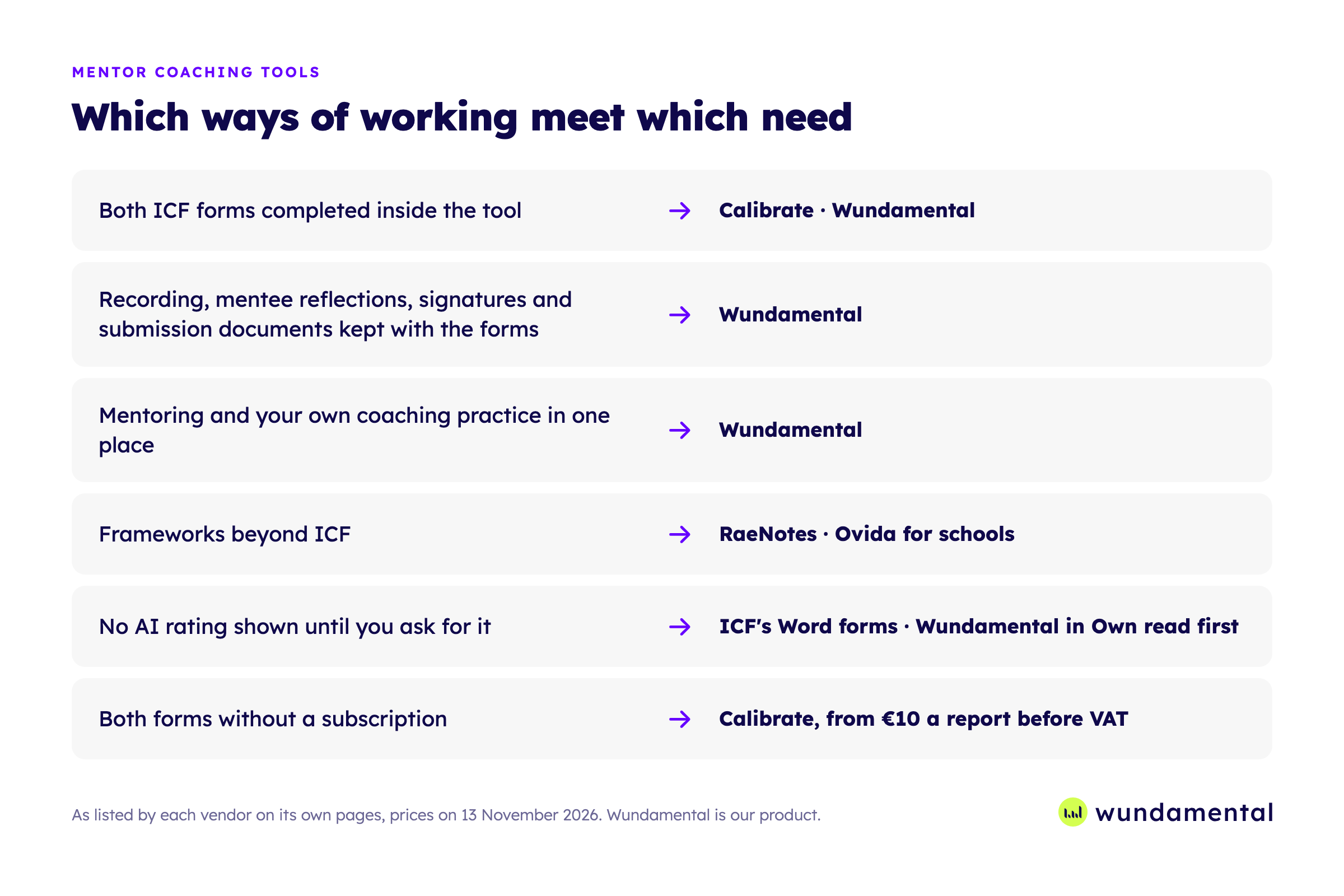
Start from the one thing you will not give up. This is what each vendor lists today.
- Both ICF forms completed inside the tool: Calibrate and Wundamental. Mentor Coaching AI exports both as PDF.
- The recording, your mentee's own reflections, your signatures and the submission documents kept with the forms: Wundamental.
- Your mentoring and your own coaching practice in one place: Wundamental.
- Frameworks beyond ICF: RaeNotes, and Ovida for schools.
- No AI rating shown until you ask for it: ICF's Word forms, or Wundamental in "Own read first". CredentialPrep describes its AI read as optional.
- Both forms without a subscription: Calibrate, from €10 a report before VAT, and less in packs.
Then try it on a session you have already reviewed. You know what you found in it, so you will see at once what the software adds. Wundamental's first three sessions are free, with no card.
Prices are as listed by each vendor on 13 November 2026, and features as described on their own pages. Wundamental is our product.
Common questions
Wundamental vs RaeNotes: what is the difference?
RaeNotes puts transcript, audio and competency tagging in one view, supports frameworks beyond ICF, and has been online since 2019. It exports a filled ICF assessment form, and its pages do not say whether that covers the two 2027 forms. In Wundamental you complete the Session Observation Form and the Competency Review Form at ACC, PCC and MCC, and the engagement record is kept with them.
Is there a RaeNotes alternative for ICF's new forms?
Calibrate and Wundamental both support the two forms today, and Mentor Coaching AI lists exports of both on its mentor plan. RaeNotes exports a filled ICF assessment form, so ask whether it covers the 2027 forms.
Wundamental vs Calibrate: what is the difference?
Calibrate drafts both forms with proposed ratings for you to correct, sells single reports from €10, and does not keep the original recording. Wundamental starts every rating empty with a suggestion beside it that you can hide or switch off, keeps the recording and the engagement record, and is a monthly plan.
Which mentor coaching software works in my language?
Wundamental transcribes over 30 languages and writes its analysis in English, with each quote in the original language. Calibrate takes sessions in any language and writes reports in 7, and RaeNotes lists 11 on its page for coaches. Mentor Coaching AI and CredentialPrep do not state languages on their pages.
What is the lowest-cost way to complete the forms?
ICF's own Word forms. The cost is your time replaying the recording to find each piece of evidence.
Sources
- ICF Support: 2027 changes to ACC and PCC credential requirements
- ICF: PCC Session Observation Form
- ICF: Introducing the Mentor Coach Specialization
- RaeNotes: pricing
- RaeNotes: for coaches
- Internet Archive: earliest saved copies of each vendor site
- RaeNotes: security
- Calibrate
- Calibrate: privacy policy
- Mentor Coaching AI: pricing
- Mentor Coaching AI: terms
- Ovida: for coaching schools, universities and mentor coaches
- ICF Support: guidance for applicants who complete mentor coaching before 1 January 2027
- Mentor Coaching AI: privacy policy
- CredentialPrep: mentor coach beta
- CredentialPrep: privacy
- Mentor Coaching AI: home
- Fireflies: privacy policy
- tldv: privacy policy